
8 Bit Tower Defense Beginner Guide — First Hour on Roblox
Roblox 8 Bit Tower Defense beginner guide: starter units, battle cash vs hub Gold, first-hour goals, and common mistakes. Pixel TD; last checked 2026-11-16.
FAQ
Which starter unit should you pick in 8 Bit Tower Defense?
What is the difference between cash and Gold?
What should a new player do in the first hour?
What should a new Roblox player do first in 8 Bit Tower Defense?
Redeem dual-sourced codes, play the onboarding match, pick a starter unit, then push Greenfield Outpost Act 1 on Normal while learning battle cash (in-run) versus Gold (hub). This guide covers 8 Bit Tower Defense by Pixel TD, not the separate Roblox game Pixel Tower Defense.
Which starter unit should you choose: Pebble Frog, Honey Bee, or Dart Dragonfly?
The tutorial offers three starters. Card lines below are quoted from 8bit-towerdefense.wiki unit snapshots (2026-11-13), not official Pixel TD stat sheets:
| Starter | Reported card line | Role hint |
|---|---|---|
| Pebble Frog | Single target / Long range / Hits flying | Safe ranged pick when flyers leak |
| Honey Bee | Swarm striker / Fast stings / Swarm bonus | Swarm lanes and early wave volume |
| Dart Dragonfly | Dart volleys / Hits flying | Flying coverage with volley pattern |
Rare starters are not your endgame roster. The detailed stat lines in the table above come from 8bit-towerdefense.wiki; we did not capture the starter pick screen ourselves. Summon more units with Gems (how to get units) once codes and Index rewards land.
Not confirmed: exact damage numbers, attack speed, or “best” starter win rates—only community role reads.
What is the difference between battle cash and Gold?
| Currency | Where you see it | What it buys |
|---|---|---|
| Cash | Top bar during a wave (green + on kills) | Place units on lit tiles, tap UPGRADE mid-fight |
| Gold | Hub currency (coin icon) | UNIT LEVEL UP on owned units between runs |
Before wave 1 you place units. In the recording below, a dotted circle shows the range of the unit being placed, a green START button waits on the right, and CANCEL sits at the bottom:

Cash resets each run. Gold persists and gates long-term power. The LEVEL tab of a unit shows how it works: a level-1 unit costs 65 Gold to level up, +10 levels costs 3,885 Gold, each level adds 1.41% damage compounding to 4x at level 100 (the panel lists +300% from levels at level 100), and each level costs more than the last. Squad units also earn XP from every match, won or lost. GameRant’s codes article likewise talks about leveling toward 100 with Gold (GameRant codes).
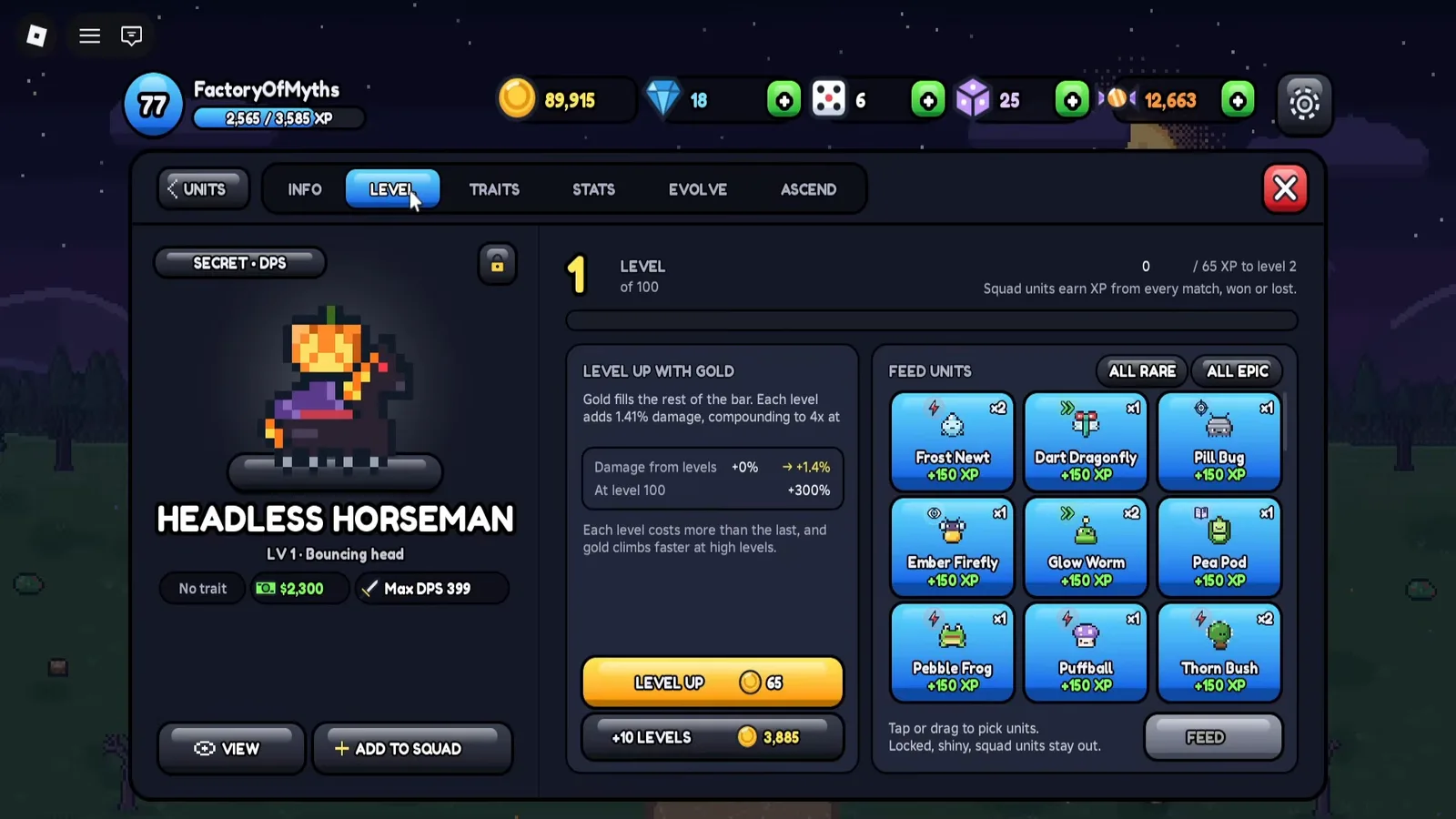
You can also feed duplicate units for +150 XP each (Rare and Epic filters; locked, shiny and squad units stay out).
Do not confuse this loop with Gems (summons) or reroll tokens; see currencies explained.
What does a brand-new account start with?
A new account in the POCKET-CODES recording shows 300 Gold, 500 Gems and 1 dice in the top bar, with no Stat Rerolls or Candy. The same Settings screen has the code box and group reward (all codes):
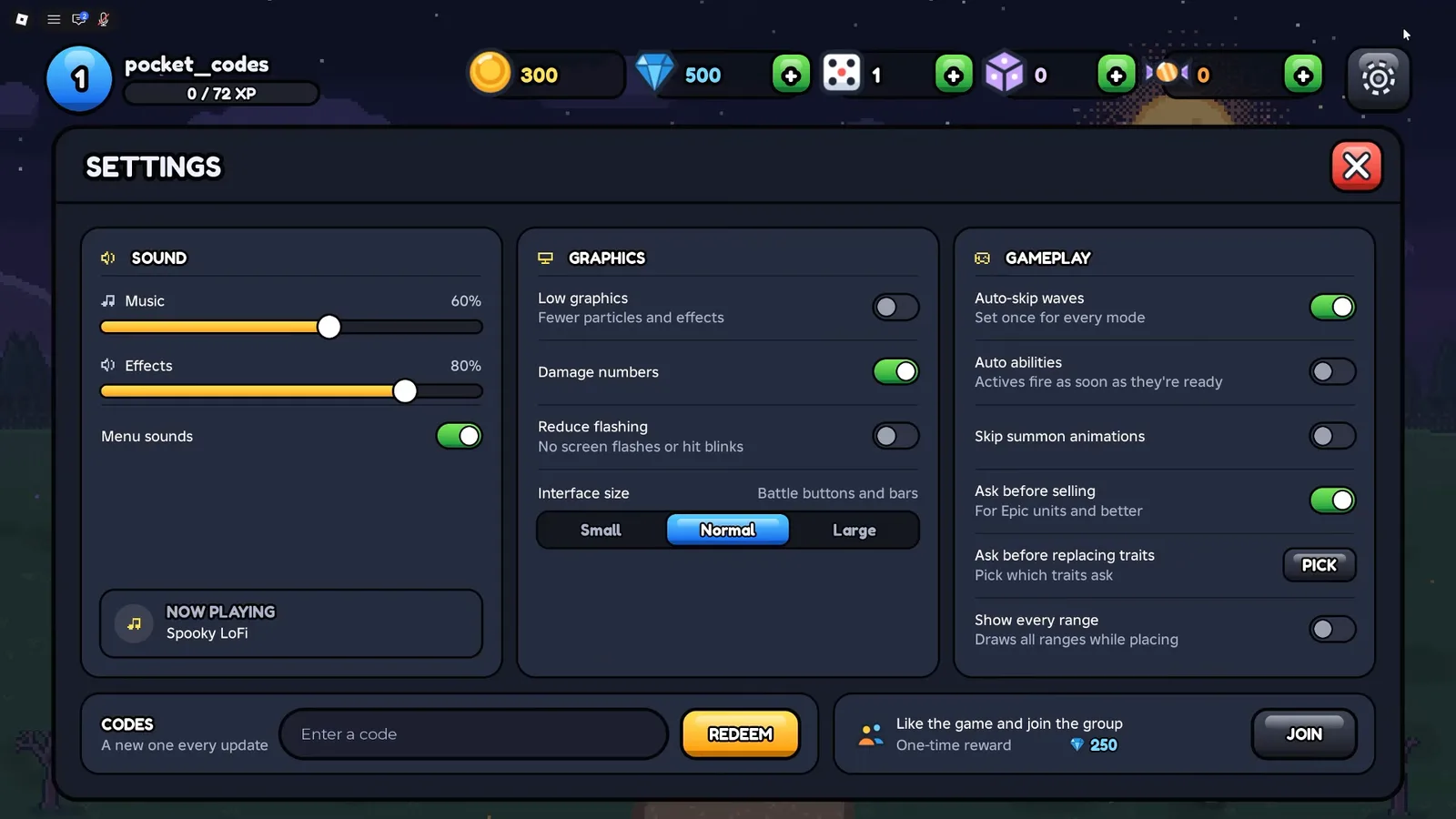
500 Gems is exactly one SUMMON x10 on a 500-gem banner, which is why the first-hour list below spends them early. Useful toggles on the same screen include Auto-skip waves (“set once for every mode”), Auto abilities and Skip summon animations.
Do you still earn rewards when you lose?
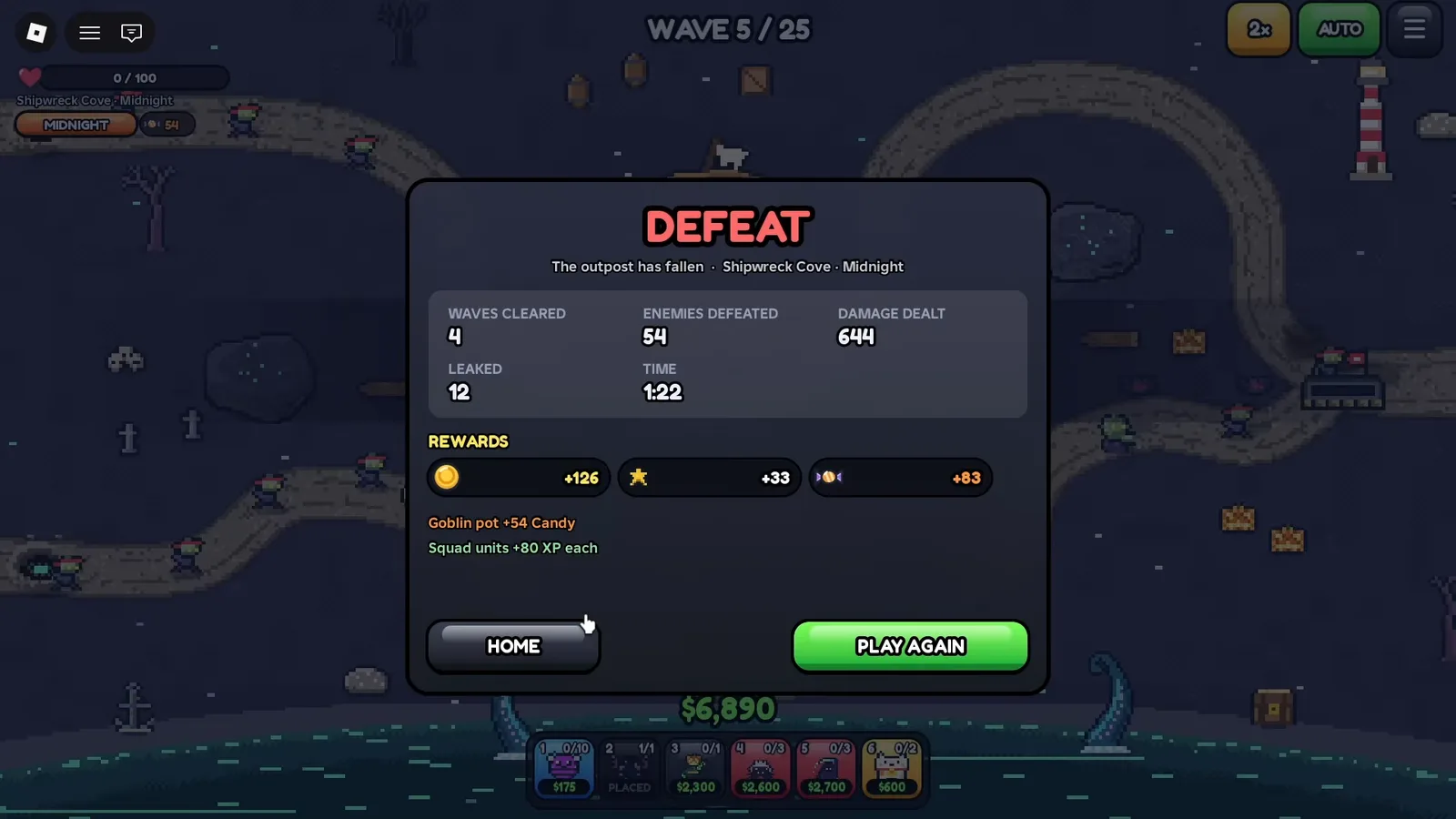
Yes. The recording below ends a run at wave 5 of 25 with a DEFEAT screen, and the run still paid out: +126 gold, +33 next to a star icon, and +83 event Candy, plus a “Goblin pot +54 Candy” line and “Squad units +80 XP each”. Treat a loss as practice that still funds your levels.
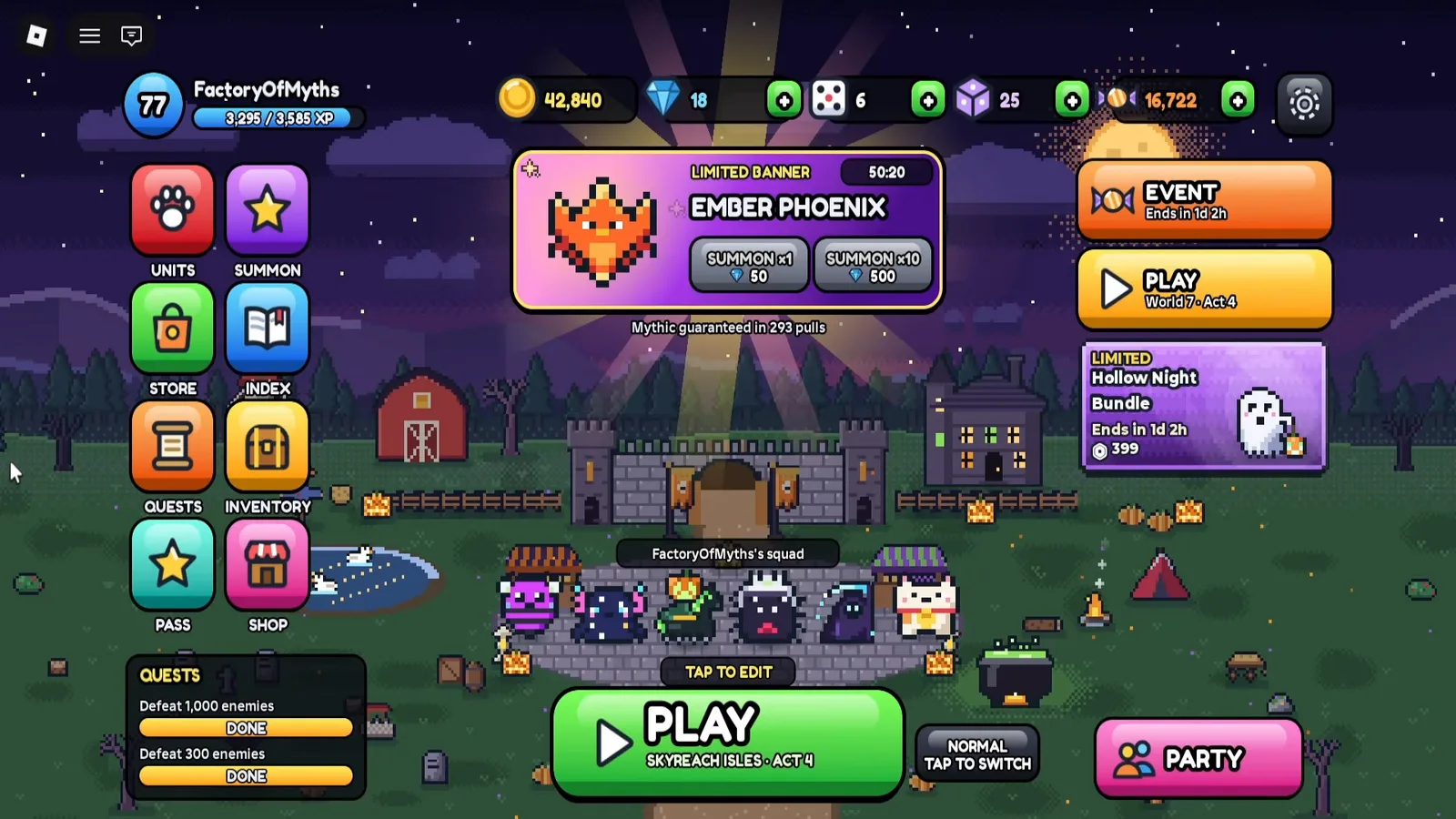
The lobby is where you spend those rewards. It holds UNITS, SUMMON, STORE, INDEX, QUESTS, INVENTORY, PASS and SHOP on the left, plus a NORMAL / tap to switch difficulty toggle next to the PLAY button:
What should your first hour look like?
- Redeem codes in Settings (all codes)—reported active; we have not re-tested every code in-game.
- Finish the tutorial fight: place on lit spots, press START, upgrade with cash.
- Claim the group reward under Settings if you like the game and join the Pixel TD Roblox group. The Settings screen in mid-November 2026 footage shows a one-time 250 Gems reward (the wiki reports an older +100 Gems and +1 Trait Reroll).
- Story → Greenfield Outpost → Act 1 → Normal (difficulty levels).
- First SUMMON x10 (500 Gems) after skimming summon rates (how to get units).
- Claim Index discovery rewards after pulls feed Gems back.
What mistakes do beginners make?
| Mistake | Why it hurts | Fix |
|---|---|---|
| Spending all Gems before understanding Index refunds | Slower second roster | Summon in tens, then Claim All on Index |
| Max upgrading every tile with cash | Runs out of cash before boss waves | Upgrade one carry first |
| Ignoring flying text on cards | Air lanes leak | Add Pebble Frog or Dart Dragonfly logic early |
| Confusing Gold with cash | Hub upgrades stall | Gold only in UNITS menu between runs |
| Skipping codes because one failed | Leaves thousands of Gems on table | Copy from codes page, check spelling |
| Chasing Nightmare day one | Wipes without economy | Clear Normal Act 1 first |
Where should you go after Act 1?
- Units: unit tier list for role-based priorities (community-sourced).
- Traits: save rerolls until your keeper units are set (traits guide).
- World Boss: Greenfield Act 3 unlocks Tide Titan—see world boss guide when you reach it.
Sources and last check
Last checked: 2026-11-16.
| Source | URL | Used for |
|---|---|---|
| Roblox experience page | https://www.roblox.com/games/110546355710189/8-Bit-Tower-Defense | Official feature list |
| 8bit-towerdefense.wiki | https://8bit-towerdefense.wiki/ | Starter card lines, first-battle steps |
| GameRant codes | https://gamerant.com/8-bit-tower-defense-codes-roblox/ | Gold leveling context |
| FactoryOfMyths | https://www.youtube.com/watch?v=pchn7RFjncg | Lobby, placement, LEVEL tab and DEFEAT screenshots (read from the screen) |
| POCKET-CODES | https://www.youtube.com/watch?v=GvgtGYrvyIQ | New-account Settings screen: starting resources, group reward, toggles |
Still not confirmed: Starter DPS math, optimal third unit timings, exact cash income formulas, the starter pick screen layout.
Related Articles
bosses
Scarecrow Boss Guide - 8 Bit Tower Defense Act 1
Beat Scarecrow in 8 Bit Tower Defense Greenfield Outpost Act 1: the wave 8 banner, placement tips and what is unconfirmed. Sources checked 2026-11-16.
bosses
How to Beat Tide Titan in 8 Bit Tower Defense
Tide Titan World Boss guide for 8 Bit Tower Defense: how it unlocks after Act 3, what the wiki documents, general prep habits, and what is unconfirmed.
codes
8 Bit Tower Defense Codes: All Working (November 2026)
Working 8 Bit Tower Defense codes for Gems, Gold, rerolls, and Candy. How to redeem in Settings, dual-source list, last checked 2026-11-16 (not in-game tested).
Was this helpful?
Thanks for the feedback!